Olo's Front of House solution provides one of the best performances on wait time accuracy. We continue to evolve our quoting algorithm models to ensure accuracy is maintained and improved over time.
Skip To:
- How it Works
- Best Practices to Improve Quoting Accuracy
- Quote Padding
- Dynamic Bucketing
- Holiday Settings
How it Works
The Host system utilizes an adaptive algorithm, updated every week on a rolling 3 weeks of location-specific data, to ensure that quoting estimates use the most recent business trends to predict each party's wait.
For an initial brand launch, in the absence of data, the system leverages an algorithm tuned to industry norms that flips to the adaptive algorithm over time.
For new restaurant openings at a brand already up and running, the system can leverage a "like restaurant" model within that brand. For example, you can select the model from the 4 newest locations launched to seed the model for an upcoming opening.
Finally, the system offers multiple interventions to the model that allows operators fine grained control - from single-quote overrides, to multi-hour padding, to full day overrides for unique circumstances (e.g., holidays).
Best Practices to Improve Quoting Accuracy
Call Ahead Parties
- If a party not physically in the restaurant called to be added to the waitlist, make sure it’s marked as “call-ahead” (even if they claimed they will be in the restaurant in 5 minutes)
- Call-Ahead wait time upon check-in = The time they were originally quoted, minus the time they already waited
Party Creation
- Party size needs to be entered correctly upon creation
- If a party indicated a section request (Patio, indoor, outdoor etc), it should be indicated in the Host app under "Section Preference"
Party Seating
- Seat parties in real-time
- Seat parties of the same size in the order they arrive
- Ex. parties of 4 arriving at 6:30 should be seated earlier than parties of 4 arriving at 6:35
- Consistency in the policy of seating parties of different sizes
- Ex. parties of 2 should not be seated at a 6-top
- If the party has not arrived after a specified time (after notifying the guest), mark them as "No-Show" which automatically removes the party from the waitlist.
Quote Padding
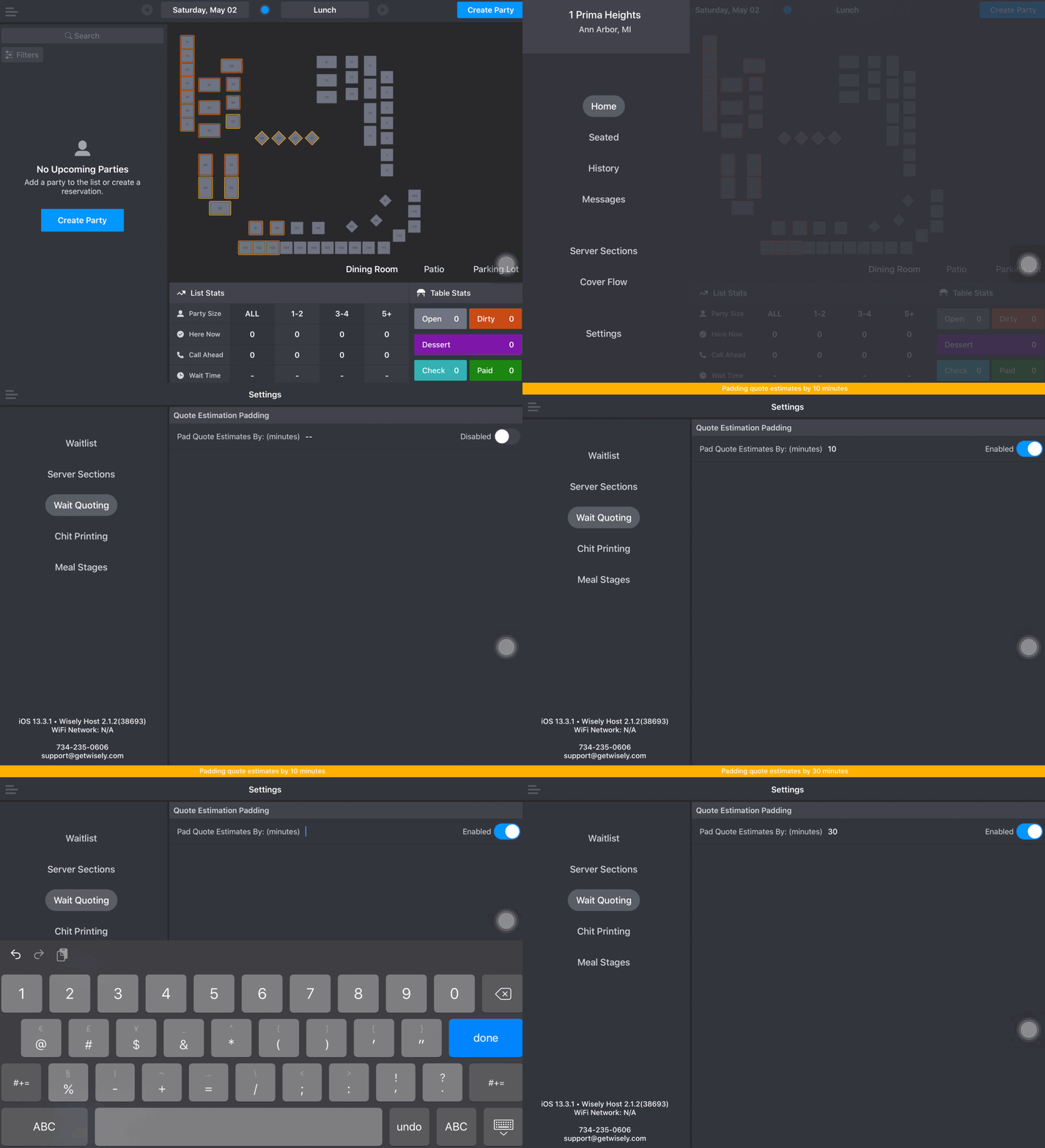
To assist your quotes being as accurate as possible not only during this time, but also at any time your wait quotes are not accurate, the Host app allows you to pad the quoting whenever you need it. To access this feature, click on Menu > Settings > Wait Quoting.
To activate the padding:
- Toggle the switch to 'Enabled'. By default, your estimation will be padded by 10min - meaning that if your quote was 10 - 20min, it will now be 10 - 30min.
- To increase or decrease the number of minutes you want the quote to be padded by, simply click on the number of minutes and edit it to the desired amount. Negative numbers will also work if you find your estimate to be over-quoting.
NOTE: The padding is reflected not only in the online forms but also in all remote integrations, such as Google. The padding only lasts for the day it is enabled and automatically disables this feature the next day.
Dynamic Bucketing
We introduced 'Dynamic Bucketing' to group wait quotes into more accurate ranges rather than grouping wait quotes into traditional static buckets.
-
-
- Prior to our Spring 2021 release, a 29-minute quote would be given a range of 25-35 minutes, rather than 20-30. The dynamic bucket is calculated on the quote being the midpoint of the range, rather than falling within a static bucket (where the quote might fall on the high end of the static range).
- Different restaurants have different ideas about how wide the range of quote estimates should be for any given quote - typically, the longer the estimated wait time, the larger the range should be. Example:
-
-
- For any quote less than 30 minutes, make the range 10 minutes wide
- 29 minutes quote → 25-35 minutes
- For any quote 30-60 minutes, make the range 15 minutes wide
- 39 minute quote → 30-45 minutes
- For any quote longer than 60 minutes, make the range 30 minutes
- 90 minute quote → 75-105 minutes
- For any quote less than 30 minutes, make the range 10 minutes wide
-
-
-
Holiday Settings
A restaurant’s holiday quoting is oftentimes very different from quoting within a normal shift. To improve the quoting accuracy on those special days, operators can now pad the quote in advance so they can focus on their guests.
Admin users can now access their Holiday Setting via the Dashboard under Settings > Host> Waitlist & Reservations
To create a new holiday padding setting, click on Add Holiday.

You will then have the ability to select a date and time frame in which to apply the holiday setting as well as the participating locations.

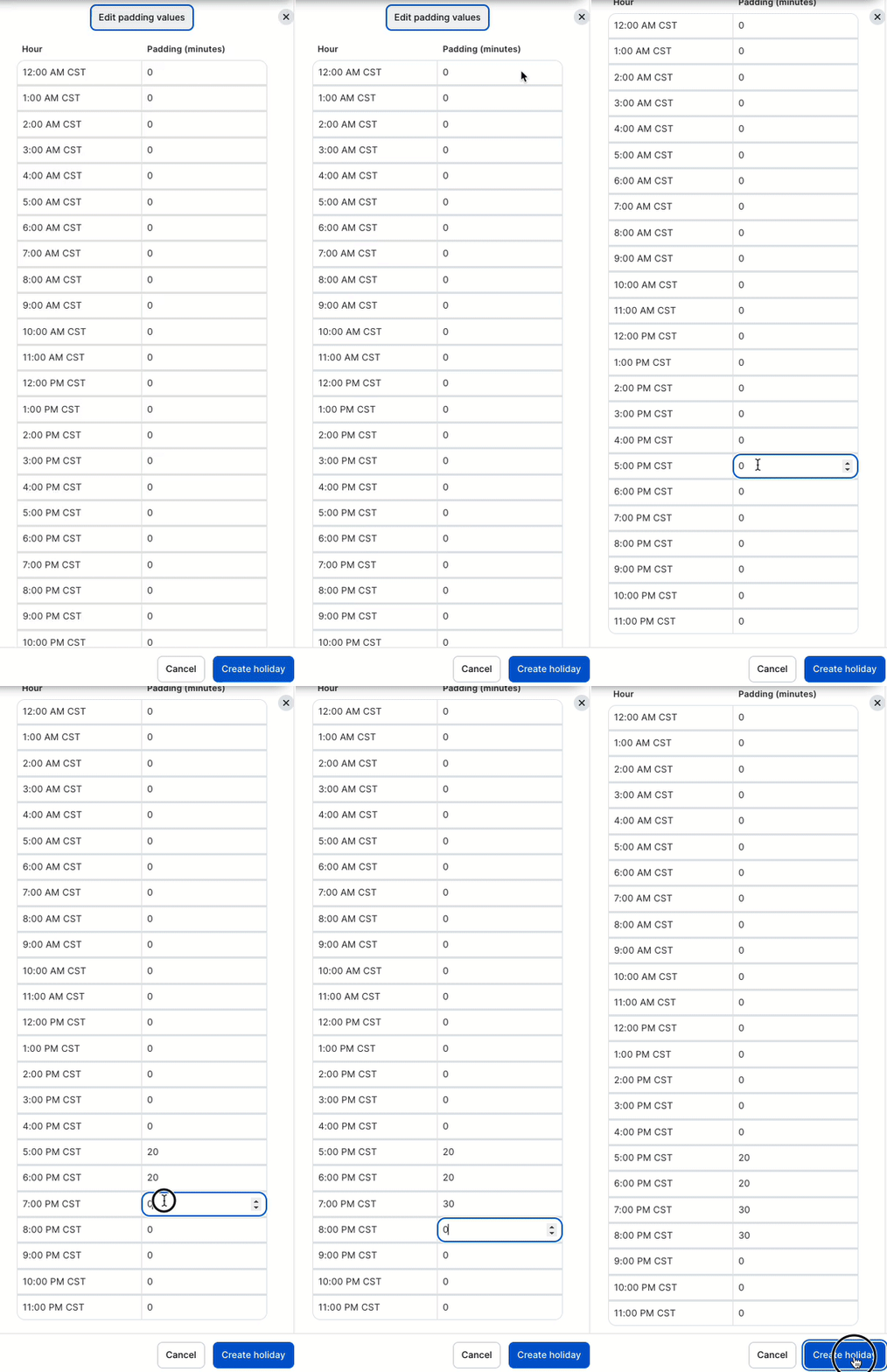
Once your date, time, and locations are selected, enter a title for that holiday and click Edit padding values to continue.
Next, you will add the number of minutes you'd like to add to your quote at each specific timeslot. Once configured, click Create Holiday to save.
NOTE: If your holiday settings apply to multiple locations, padding can still be adjusted at the location level if needed without affecting the other selected locations.
NOTE: Please reference the Holiday Best Practices article for additional information.